


How to Print Vietnam E-visa Correctly: The Complete 2026 Technical Guide
Imagine standing at the immigration counter after a long-haul flight, only to have the officer reject your paperwork because of a faint line or a blurry barcode. It’s a high-stakes moment that can turn an exciting arrival into a stressful bureaucratic hurdle. Knowing how to print vietnam evisa correctly is the final, most critical step of your application process, yet it’s the one most travelers overlook until they’re already at the boarding gate.
We understand the anxiety that comes with international travel documentation. As a professional commercial visa service, we’ve spent years refining the technical details that ensure a seamless transition through the border. This guide provides the exact printer settings and paper requirements to satisfy 2026 immigration standards, giving you total confidence before you board your flight.
We’ll walk you through the essential resolution specs, the truth about color versus black and white printing, and the vital backup procedures for travelers who encounter last-minute technical failures. By following these precise steps, you’ll secure a professional-grade document that guarantees a smooth start to your journey.
Key Takeaways
- Understand why a physical printout is a non-negotiable legal requirement and why digital versions on smartphones are frequently rejected by immigration officers.
- Master the specific technical settings for how to print vietnam evisa correctly, focusing on A4 paper sizing and the advantages of laser printing for document longevity.
- Learn how to perform a pre-flight barcode test to ensure your QR code scans perfectly and avoids the risk of manual review.
- Identify common printing errors such as ink smudges or faded lines that can lead to entry delays or documentation rejection at the border.
- Develop a secure backup plan for your travel folder and discover how to access 24/7 emergency assistance if your documents are lost mid-transit.
Why a Physical Vietnam E-visa Printout is Mandatory for Entry
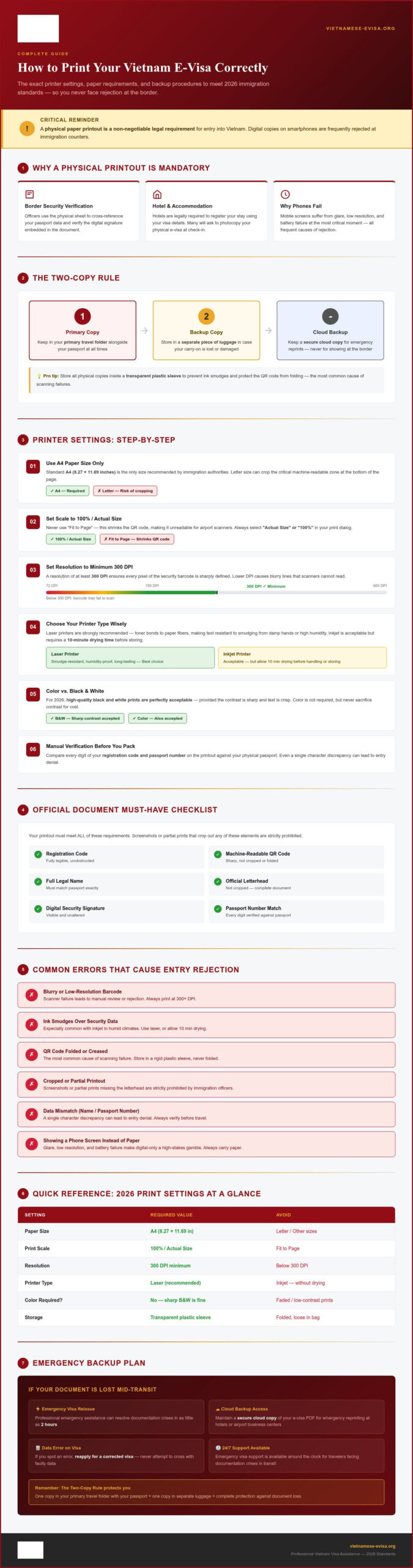
The Vietnam Immigration Department maintains strict protocols that require a physical paper trail for every foreign national entering the country. While digital transformation is sweeping through many travel sectors, the border entry process remains anchored in paper documentation. This isn’t merely a bureaucratic preference; it’s a functional necessity for the 2026 security standards. Officers use the physical sheet to cross-reference your passport data and verify the digital signature embedded in the document. Relying on a smartphone screen is a high-stakes gamble that often leads to immediate rejection at the booth because mobile displays can suffer from glare, low resolution, or battery failure at the most critical moment.
Beyond the airport, your printed visa serves as your primary identification within the country. Local authorities and accommodation providers are legally required to register your stay using your visa details. Many hotels will ask to photocopy your physical e-visa during check-in. Without a hard copy, you may find it difficult to secure lodging or register with local police in rural areas. Mastering how to print vietnam evisa correctly ensures you have this vital ID ready for every stage of your trip.
Official Document Format Requirements
The 2026 Vietnam E-visa PDF contains specific security markers that must be perfectly legible for a successful entry. You must ensure the registration code, the machine-readable QR code, and your full legal name match your passport exactly. Screenshots or “partial prints” that crop out the official letterhead are strictly prohibited by immigration officers. If an officer cannot view the entire document, they cannot verify its authenticity against the national database. For those who realize their printout is incomplete while already in transit, our emergency visa support can help resolve documentation crises in as little as two hours.
Digital Backup vs. Hard Copy
We advocate for the “Two-Copy Rule” to provide maximum security. Keep one copy in your primary travel folder with your passport and a second backup copy in a separate piece of luggage. This redundancy protects you if your carry-on is misplaced or if a document is damaged by moisture. While you should maintain a digital version on a secure cloud drive for reprints, never assume a digital file will grant you entry. To keep your prints pristine, store them in a transparent plastic sleeve. This prevents ink smudges and protects the QR code from folding, which is the most common reason for scanning failures at the border. If you are still in the planning phase, consult our comprehensive 2026 application guide to ensure your data is submitted correctly before you even reach the printer.
Step-by-Step: How to Print Your Vietnam E-visa Correctly
Achieving a perfect printout requires more than just hitting a button. To ensure your documentation meets the rigorous 2026 entry standards, you must focus on technical precision. Standard A4 paper (8.27 x 11.69 inches) is the only size recommended by immigration authorities. While Letter size is common in North America, it can sometimes crop the critical machine-readable zone at the bottom of the page. We strongly advise using a laser printer. Laser toner bonds to the paper fibers, making the text resistant to smudging if your hands are damp or if you encounter high humidity upon arrival. If you only have access to an inkjet printer, allow the page to dry completely for at least ten minutes before placing it in a folder.
One common misconception is that you must use color ink. For 2026, high-quality black and white prints are perfectly acceptable, provided the contrast is sharp and the text is crisp. Before you finalize your travel pack, perform a manual verification. Compare every digit of your registration code and passport number on the printout against your physical passport. Even a single character discrepancy can lead to entry denial. If you find an error on your issued document, it’s safer to reapply for a corrected visa rather than attempting to cross with faulty data.
Configuring Your Printer Settings
Technical distortions are the leading cause of barcode scanning failures. When you open your PDF, set the print scale to ‘100%’ or ‘Actual Size’. Avoid ‘Fit to Page’ settings, as these can shrink the QR code, making it unreadable for airport scanners. Set your resolution to a minimum of 300 DPI to ensure every pixel of the security barcode is defined. Keep your margins at ‘Default’ to prevent the official borders or registration numbers from being cut off during the process.
Paper Quality and Durability
The physical integrity of your visa matters. Use paper with a weight of at least 80gsm to prevent ink bleeding and ensure the document doesn’t tear easily during transit. Don’t use ‘Eco-mode’ or ‘Draft’ settings; these save ink by reducing saturation, which results in faded barcodes that fail security checks. Finally, don’t laminate your visa. Immigration officers often need to feel the paper texture or apply official stamps directly to the sheet. A laminated document is considered altered and may be rejected immediately.
Troubleshooting Barcode and Layout Issues on Your Printed Visa
Even the most advanced printers can produce artifacts that jeopardize your entry. A streaky barcode or a smudge over your registration number might seem minor, but it often triggers a manual review process that adds hours to your border crossing. Learning how to print vietnam evisa correctly involves verifying the technical output before you leave for the airport. If your printout contains horizontal lines through the QR code, the infrared scanners used at Vietnam international airports will fail to decode your data. This is why high-contrast black ink is mandatory; the scanner requires a sharp distinction between the black modules and the white background.
Visual artifacts like faded ink or “ghosting” are frequently rejected. These issues usually stem from low toner levels or clogged inkjet nozzles. If you notice any distortion, reprint the document immediately. It’s also vital to check how your printer handles special characters. If your name contains accents or non-English characters that appear as garbled text or boxes, the document is technically invalid. Officers require an exact match to the machine-readable zone of your passport. If you discover a layout error or a scanning failure while at the airport, you can access emergency Vietnam visa assistance to secure a fresh, verified document in time for your boarding call.
Fixing QR Code Scanning Errors
A reliable way to test your document is the “Phone Scan” trick. Open your smartphone camera and try to scan the QR code on the paper. If your phone cannot instantly recognize the data, the immigration officer’s scanner won’t either. If the code appears streaky, run a “clean print heads” cycle on your hardware. High-contrast output is the goal. For those using older printers, ensure the “toner save” feature is disabled, as this often lightens the barcode modules beyond the point of legibility for infrared border scanners.
Layout and Margin Adjustments
Modern e-visas are formatted for Portrait orientation. Ensure your printer doesn’t default to Landscape, which can stretch the image and distort the layout. Your unique Approval Number must be fully visible in the top right corner. Furthermore, disable any “Header and Footer” settings in your browser’s print menu. These settings often add unnecessary URLs or date stamps to the top and bottom of the page, which can overlap with the official e-visa information and cause confusion during the inspection process. If the bottom of the PDF is cut off, go back to your settings and ensure the scale is set to 100% rather than “Fit to Page.”
Managing Your Documentation and Securing Emergency Visa Support
Success at the border depends on your organization as much as your printer settings. Once you have mastered how to print vietnam evisa correctly, place the document in a dedicated travel folder alongside your passport and boarding passes. Keeping these items together prevents the frantic search at the immigration booth that often leads to dropped or damaged paperwork. If your visa is lost or suffers significant damage during your flight, such as a liquid spill that obscures the QR code, don’t panic. Major international transit hubs usually offer 24-hour business centers where you can reprint your PDF from your cloud backup. However, if the error is data-based rather than physical, a simple reprint won’t suffice.
Identifying critical errors before boarding is essential. If you notice your passport number or birth date is incorrect on the printed page, immigration officers will likely deny entry. In these high-stakes moments, professional intervention is the fastest way to salvage your travel plans. Our team acts as an expert intermediary to resolve these discrepancies before they result in a boarding denial or entry refusal.
Emergency Vietnam Visa Assistance
We provide a vital safety net for travelers facing documentation crises. Vietnam-Evisa.Org specializes in urgent corrections and expedited processing for those who discover errors at the last minute. Our 24/7 support line ensures that expert guidance is always available, regardless of your time zone or transit location. When time is the primary constraint, understanding the Vietnam visa fees for expedited emergency processing helps you make an informed decision quickly. We prioritize speed and accuracy to ensure you meet your entry requirements without unnecessary delays.
Final Checklist Before You Fly
Perform a final 30-second review before you head to the departure gate. Verify that your passport number, date of birth, and entry date on the printout match your passport exactly. It’s also beneficial to review the Vietnam E-visa 2026 application guide one last time to ensure you haven’t missed any specific entry rules or port-of-entry restrictions. As a final precaution, keep your printed visa tucked inside your passport’s main page. This simple habit ensures the document is always at hand when requested by airline staff or border authorities, providing peace of mind throughout your journey.
Secure Your Entry with Technical Precision
Your journey begins with the clarity of your documentation. By following the specific printer settings and paper requirements detailed in this guide, you have eliminated the most common risks associated with border entry. A single faint line or a distorted QR code can lead to stressful delays at the immigration counter. Mastering how to print vietnam evisa correctly is the final, vital step in ensuring your 2026 travel plans remain on schedule. Always maintain two physical copies on high-quality A4 paper and perform a final manual verification of your passport data before heading to the departure gate.
If you discover a critical data error or realize your printout is illegible while in transit, don’t leave your entry to chance. Apply for your urgent Vietnam visa here to receive immediate assistance. We provide same-day emergency processing and an expert document review to prevent technical printing failures before they happen. With our 24/7 dedicated traveler support, we serve as your reliable partner in resolving high-stakes documentation issues. Secure your peace of mind now and prepare for a seamless arrival.
Frequently Asked Questions
Can I show my Vietnam E-visa on my smartphone instead of printing it?
No, you must present a physical paper copy of your visa at the immigration counter. While you might have the PDF on your smartphone, officers frequently reject digital versions due to glare or scanning difficulties. A hard copy allows authorities to cross-reference your details and apply necessary entry stamps without technical delays. Always ensure you have the paper document ready before reaching the border booth to avoid being turned away or forced to find a printer.
Does the Vietnam E-visa have to be printed in color for 2026?
Color printing is not a legal requirement for 2026. A high-quality black and white print is perfectly acceptable as long as all text and the QR code are sharp and legible. The key is contrast; the infrared scanners at the border need a clear distinction between the black modules and the white paper. If your black and white print looks gray or faded, it’s safer to reprint using a fresh toner cartridge to ensure readability.
What should I do if my printer cuts off the bottom of the visa PDF?
If the bottom of your document is missing, adjust your printer settings to “Actual Size” or “100% Scale” instead of “Fit to Page.” This is a common issue when printing on Letter size paper instead of the recommended A4. Ensuring you know how to print vietnam evisa correctly involves checking that the entire machine-readable zone at the bottom remains visible. If information is still missing, try saving the file as an image before printing to preserve the margins.
Is it okay to print my Vietnam visa on both sides of the paper?
You should print your visa on a single-sided sheet of paper. Avoid double-sided printing, as immigration officers may need to inspect the back of the page or apply official stamps directly to the sheet. Using a single-sided format ensures that all information is immediately visible and accessible for the officer’s review. Using a fresh, clean sheet of 80gsm paper will provide the durability needed for the duration of your stay without risking ink transfer between sides.
What if the barcode on my printed E-visa looks slightly blurry?
A blurry barcode is a significant risk that often leads to manual processing and long delays. If the QR code isn’t crisp, the scanners won’t be able to retrieve your data from the national system. Clean your printer heads or switch to a laser printer to achieve the necessary resolution. It’s vital to know how to print vietnam evisa correctly so you can verify the barcode’s legibility using a smartphone camera before you depart for your flight.
How many copies of my Vietnam E-visa should I bring with me?
We recommend bringing at least two physical copies of your e-visa. Keep the primary copy with your passport in your carry-on luggage for immediate access at the border. Store the second copy in a separate piece of luggage as a backup in case the first one is lost or damaged. This redundancy provides peace of mind and ensures you have a spare for hotel check-ins or local police registrations during your journey across the country.